Flows and distribution
When a visitor clicks an ad link and lands on a campaign entry point, Qubix decides what to show them. The decision goes through four stages in a strict order: cloaking → rules → targets → fallback. Understanding this order is the key to configuring a campaign.
The order of passing
- Cloaking. First the cloaking filters trigger (geo, OS, device, User-Agent, IP, required parameters). A visitor who does not pass is sent to the whitepage and goes no further.
- Rules. Those who pass are checked against the rules top to bottom. The first matching rule wins.
- Targets. Within the winning rule the traffic is split between targets by their weights — randomly, proportionally to the weight.
- Fallback. If no rule matched — the fallback applies (the "default" block at the bottom).
Rules
A rule is a pair "conditions + targets". A visitor passes a rule if they matched its conditions; then the targets of this rule trigger.
The conditions are split into two columns:
- Whitelist — the visitor must fall into every non-empty filter. An empty filter = there is no check by this parameter.
- Blacklist — a visitor who matched any filter of this column is rejected by the rule.
You can filter by:
- the browser Language;
- Geo (country);
- OS (Android, iOS, Windows, macOS, Linux);
- Device (mobile, tablet, desktop);
- UA (regex) — a regular expression over the User-Agent;
- URL (regex) — a regular expression over the address;
- Referrer — where the visitor came from;
- GET parameters — a "key = value" pair (or "key = any value").
The rules are iterated top to bottom, so the order matters: put narrower rules higher, more general ones lower. Reorder them with the ↑ ↓ arrows.
The first matching rule wins — the rest are not checked. If above the rule you need there is a more general one that also matches, the traffic will not reach the one you need.
Targets and weights
A target is a destination where to send the visitor. Available:
- PWA + offer — show a PWA with an attached offer;
- Prelanding + PWA + offer — first a prelanding, then a PWA with an offer;
- Landing + offer — a landing with an offer;
- Whitepage — serve a whitepage as the final page;
- Redirect to offer — a redirect to the offer link;
- Redirect to URL — a redirect to an arbitrary address.
If a rule has one target — all the traffic goes to it (weight 100%). If there are several targets — each has its own weight in percent, and the traffic is split between them proportionally (for example, 70 / 30). The sum of the weights must be 100%; the ⚖️ button evens them out automatically, and the bar under the targets clearly shows the layout.
Weights are handy for an A/B split: send 50 / 50 to two PWAs or two offers and compare the result on the card's tabs.
Fallback
The fallback is a backup route for traffic that did not match any rule. It is always at the bottom of the funnel and works like an ordinary set of targets (with the same types and weights), but without conditions. This way no click is left without a destination.
If above the fallback there is a rule with no conditions, it will catch all the traffic first, and the fallback (as well as all rules below) will stop triggering — the editor highlights such "unreachable" blocks.
Cloaking
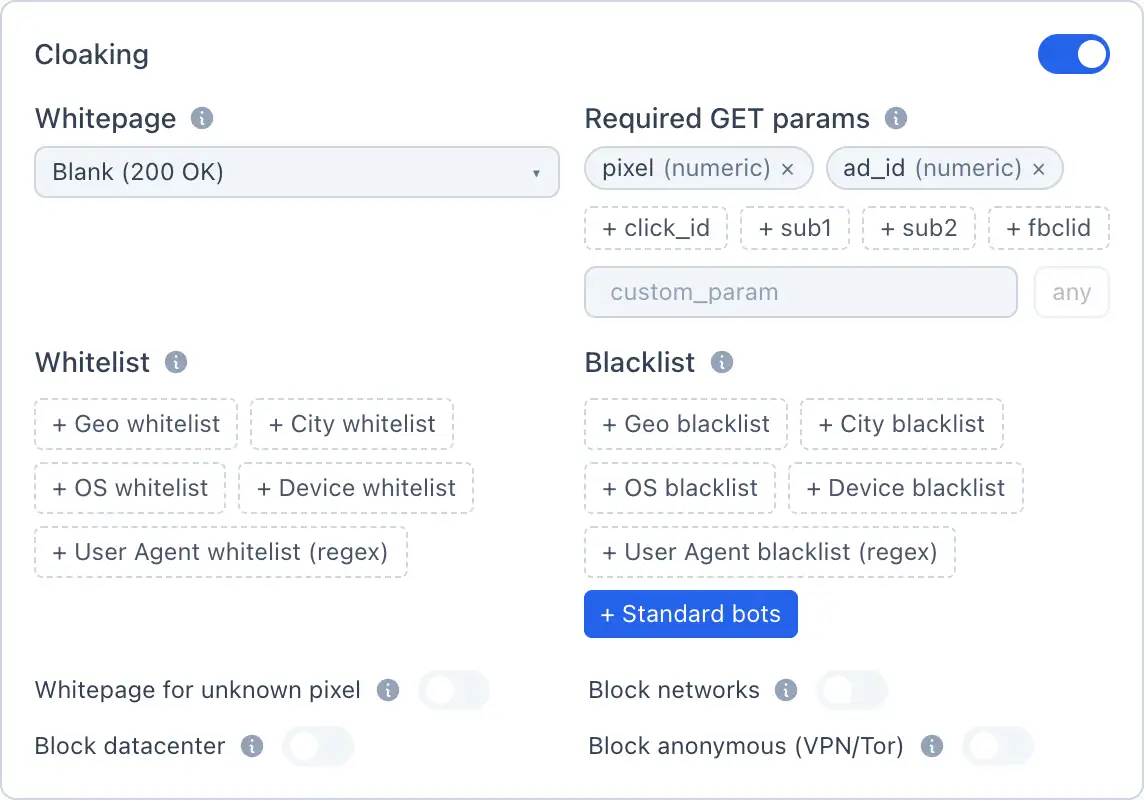
Cloaking is a gatekeeper filter that runs before the rules. While it is off, all visitors go straight to the rules. When enabled, available:
- Required GET parameters — if a visitor arrived without them, they see the whitepage.
- Whitelist (geo / OS / device / UA-regex) — we let through only matches; an empty list = there is no filter by this parameter.
- Blacklist (geo / OS / device / UA-regex) — we block matches.
- Block networks — blocking known hostings, scanners and bot networks by IP ranges.
- Block datacenter — blocking datacenter IPs.
- Block anonymous (VPN/Tor) — blocking VPN, Tor and anonymous proxies.
- Whitepage — the page a cut-off visitor sees (usually a neutral page for moderators). If no whitepage is selected, the server returns HTTP 200 with an empty body.
The whitepage and landings/prelandings are chosen from your websites — read more Websites.