Domains
The Domains section is the registry of all your domains: those bought through Qubix and those connected from outside. Here you add domains, track their status (ready for use or still being set up) and see whether antivirus has flagged a domain.
There are two ways to get a domain into this list, and Qubix supports both:
- Buy a new one through Qubix — see Register domain.
- Connect one you already own, from any registrar — see Connect an existing domain.
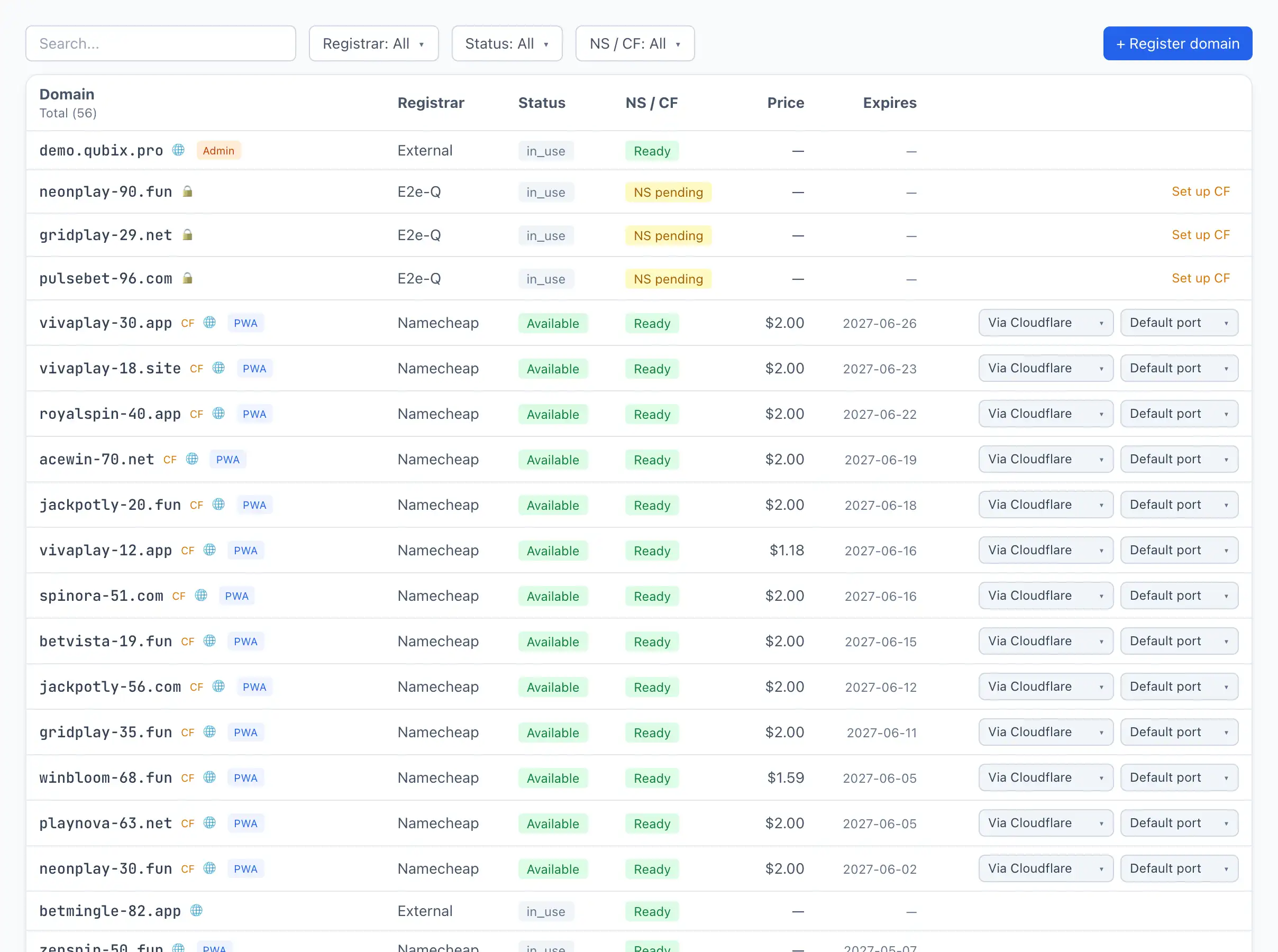
Buttons on the screen
In the top right corner above the table are action buttons:
+ Register domain — opens the window for buying a brand-new domain through Qubix. See Register domain for details.
Connect a domain — opens the window for connecting a domain you already own at another registrar. Qubix checks where the domain points and offers to connect it through Cloudflare or with your own DNS. See Connect an existing domain for details.
Check NS — appears only when there are domains still waiting for DNS to be linked. Clicking it force-polls all such domains and updates their status. By default the check runs automatically; this button is for when you don't want to wait.
Above the table is a search field by domain name.
Adding and setting up domains can also be done through the AI assistant — tell it "connect the domain mygames.click" and it does the work, asking your approval before any change. It's especially handy for custom DNS and Cloudflare tasks the buttons don't cover. See Connect with the AI assistant.
Table columns
Domain — the domain name. Next to the name there may be badges:
- CF — the domain is served through Cloudflare (DNS and SSL).
- 🚨 infected — VirusTotal found threats on the domain. The badge leads to the VirusTotal report. See VirusTotal scanning for details.
- 🔒 / 👥 / 🌐 — the domain visibility: private, team or public.
- Role badges (PWA, Postback, Admin) — what the domain is used for. See Domain settings for details.
Registrar — where the domain was bought (for example, Namecheap).
Status — the domain's state at the registrar:
- Available — the domain is active and working.
- Expired — the registration term has ended.
- Suspended — the domain is suspended.
NS / CF — the state of the DNS link to Cloudflare:
- NS pending — DNS hasn't switched to Cloudflare yet. The domain isn't ready for use yet.
- Ready — DNS is linked, the domain can be used.
Price — the registration cost.
Expires — the registration end date.
Row actions
On the right of a row for a domain that is still being set up, a quick button may appear:
- Set up CF — creates a Cloudflare zone for the domain if one hasn't been created yet.
- Check NS — polls the DNS of a Cloudflare-served domain and updates its status.
- Check DNS — for a domain connected with your own DNS, checks its A record; once it points at your server, Qubix issues the SSL certificate and switches the domain on.
- Re-setup — retries setup for a domain that ended in an error.
A live domain's row also carries the connection-method switch (Via Cloudflare / Direct), letting you change how it's served.
Clicking a row opens the domain card. See Domain settings for details.