Finances
The Payouts section shows money by month: how much in payouts came from networks, how much was spent on ads, and what the resulting profit was. The current month is pinned to the top and expanded by default.
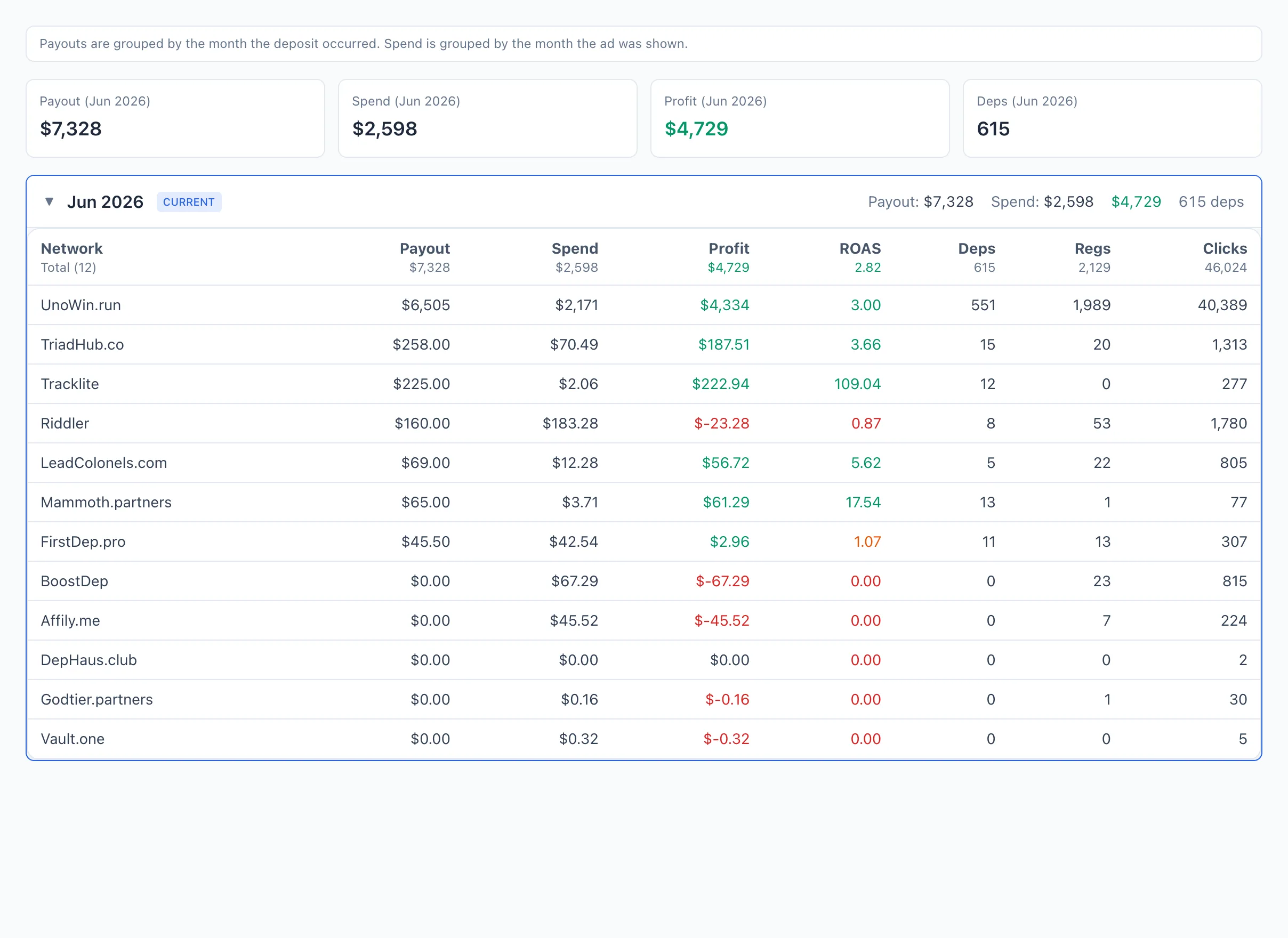
Grouping rule
Payouts are grouped by the month the deposit occurred. Spend is grouped by the month the ad was running.
This means the payout and the spend for the same bundle can land in different months if the deposit arrived later than the ad impression. Keep this in mind when comparing profit month to month.
Current-month KPIs
At the top — four cards for the current month:
- Payout ({{month}}) — the total payouts from networks for the month.
- Spend ({{month}}) — the ad spend for the month.
- Profit ({{month}}) — payout minus spend (green when positive, red when negative).
- Deps — the number of deposits for the month.
Breakdown by month
Below — a list of months as an accordion, from newest to oldest. Each month header shows a summary right away: Payout:, Spend, profit, and the number of deps. The current month is marked with a CURRENT label and highlighted with a border.
Click a month to expand the table of networks for that month. Columns:
- Network — the affiliate network.
- Payout — the payouts from this network.
- Spend — the ad spend.
- Profit — payout minus spend.
- ROAS — the return on spend.
- Deps, Regs, Clicks — the funnel volumes.
You can open a network's page from its row.