Visitors
The Visitors tab in the Events section is a list of every user who opened your PWAs during the selected period. For each visitor you can see how far they progressed through the funnel: viewed, installed the app, subscribed to push, reached registration and deposit.
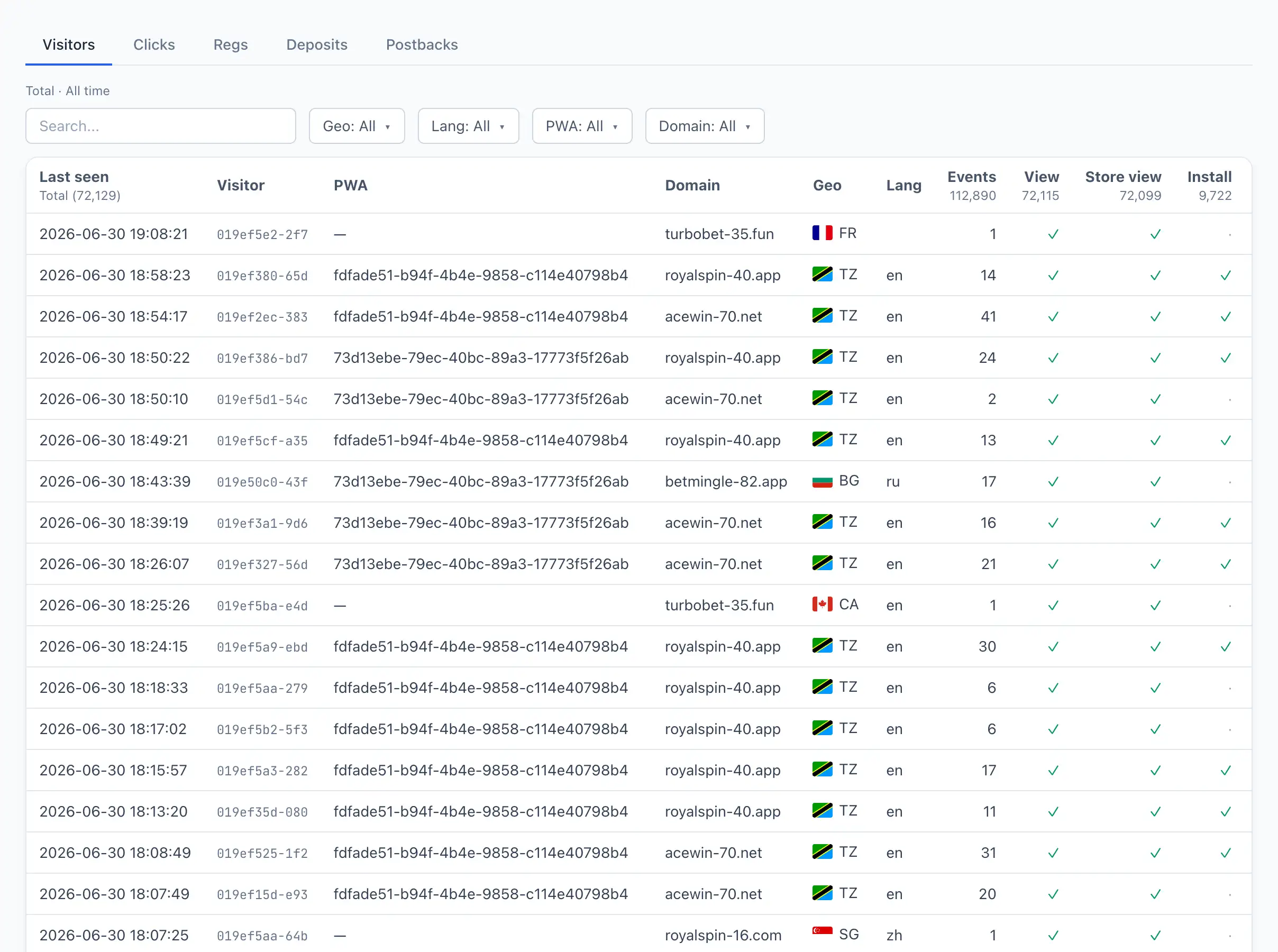
Visitor list
The table shows one row per visitor. Search works by visitor identifier; the available filters are Geo, Lang, PWA, and Domain. The list is paginated — navigate pages with the « (first), ‹ (previous), › (next), and » (last) buttons.
Columns
- Last seen — when the visitor last did something.
- Visitor — the visitor identifier (shortened). The row links to the card.
- PWA — the app the visitor came through.
- Domain — the domain the app opened on.
- Geo — the country (flag).
- Lang — the device language.
- Events — the total number of events recorded for the visitor.
- View, Store view, Install, Open, Sub — PWA funnel stages. A checkmark ✓ means the stage is completed, a dot · means it isn't.
- Push shown / Push click — how many push notifications were shown and how many were clicked.
- Reg / Dep — whether the visitor reached registration and deposit (checkmark).
- Revenue — the total payout for the visitor.
- First seen — when the visitor first opened the app.
The flag columns (View, Install, Sub, and others) can be sorted and summed — a quick way to assess at which funnel stage you lose the most people.
Visitor card
Click a row to open the card for a specific visitor. The header shows their identifier; the ← Back to list button returns to the tab.
Funnel flags
A row of labels at the top shows the completed stages: Viewed, Store view, Install blocked, Installed, Opened, Subscribed, Reg, Dep. A highlighted label with a checkmark ✓ means the stage is completed.
KPI cards
- Events — the total number of the visitor's events.
- Push shown / click — push impressions and clicks.
- Subscriptions (active/total) — how many push subscriptions are currently active and how many there were in total.
- Revenue — the total payout.
Metadata
A block with the visitor's details: PWA (with a link to the app), Domain, Geo, Lang, Device timezone, Ad ID (with a link to the ad), First seen, Last seen, Subscribed, Registered, Deposit, Offers, and IP (if there are several addresses, their count is shown next to it).
Card tabs
The card has four tabs:
- Journey — the visitor's path through the funnel as a timeline: the funnel stages (view, install, subscribe, registration, deposit, and drop-offs) laid out in order with timestamps, so you can see at a glance how far the visitor got and where they stalled.
- Events — a chronology of all the visitor's events: time, event type, PWA, domain, geo, language, device, ad ID, FBClid, pixel, and URL. Search works by event type.
- Device — the device characteristics: platform, user agent, display mode, WebView, Standalone, touch support, dark theme, connection type, screen size, and viewport. Additional device parameters are shown below, if present.
- Replay — a playback of the visitor's recorded session, if a recording exists, with play, pause and restart controls. Recording must be enabled on the PWA. See Session recording and heatmaps for details.