Fan Pages
The Fan Pages tab in the Facebook section shows all the Facebook pages that advertising runs from, collected by the FB parser. Each page is a card with an avatar, metrics and an owner. Clicking a card opens its posts.
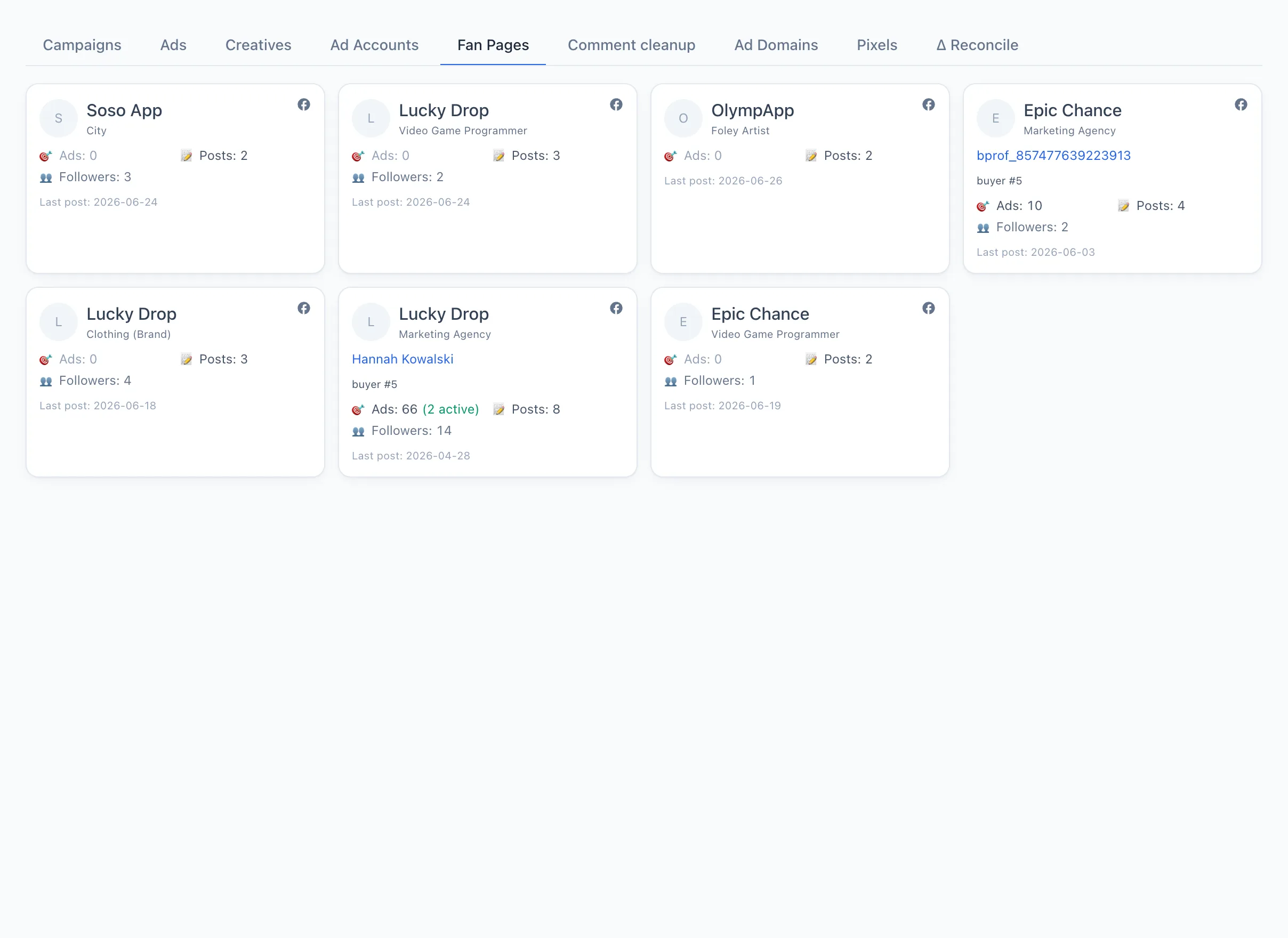
Page card
Each card contains:
- Avatar and name of the page, with its category below.
- Facebook icon in the top right corner — opens the page directly in Facebook in a new tab.
- Profile — the antidetect browser the page works from. Clicking the profile name opens it in the Browsers section.
- Buyer and team — who runs the advertising on this page.
- Metrics: Ads (active in brackets), Posts, Followers, Spend (with revenue shown on hover).
- At the bottom — the date of the last post.
note
If there are no pages, a hint will appear suggesting you run the page posts sync service. The data is collected by the FB parser — pages are not created here directly.
Page posts
Click a card to open a window with the list of posts for the selected page. For each post you can see:
- Preview of the image or video (if any).
- Publication date and a ▶︎ video label for clips.
- Post text.
- An Open link — goes to the post in Facebook.
At the top of the window are the page name, its ID (a link to Facebook) and the number of posts.