Offers
An offer is a specific network proposal you run traffic to (for example, registration and deposit in an app for a chosen geo). In Qubix an offer stores the redirect link, the link to a network, the payout terms and the list of countries. The Offers screen shows all your offers and their metrics for the selected period, and clicking a row opens the offer card with all the statistics and options.
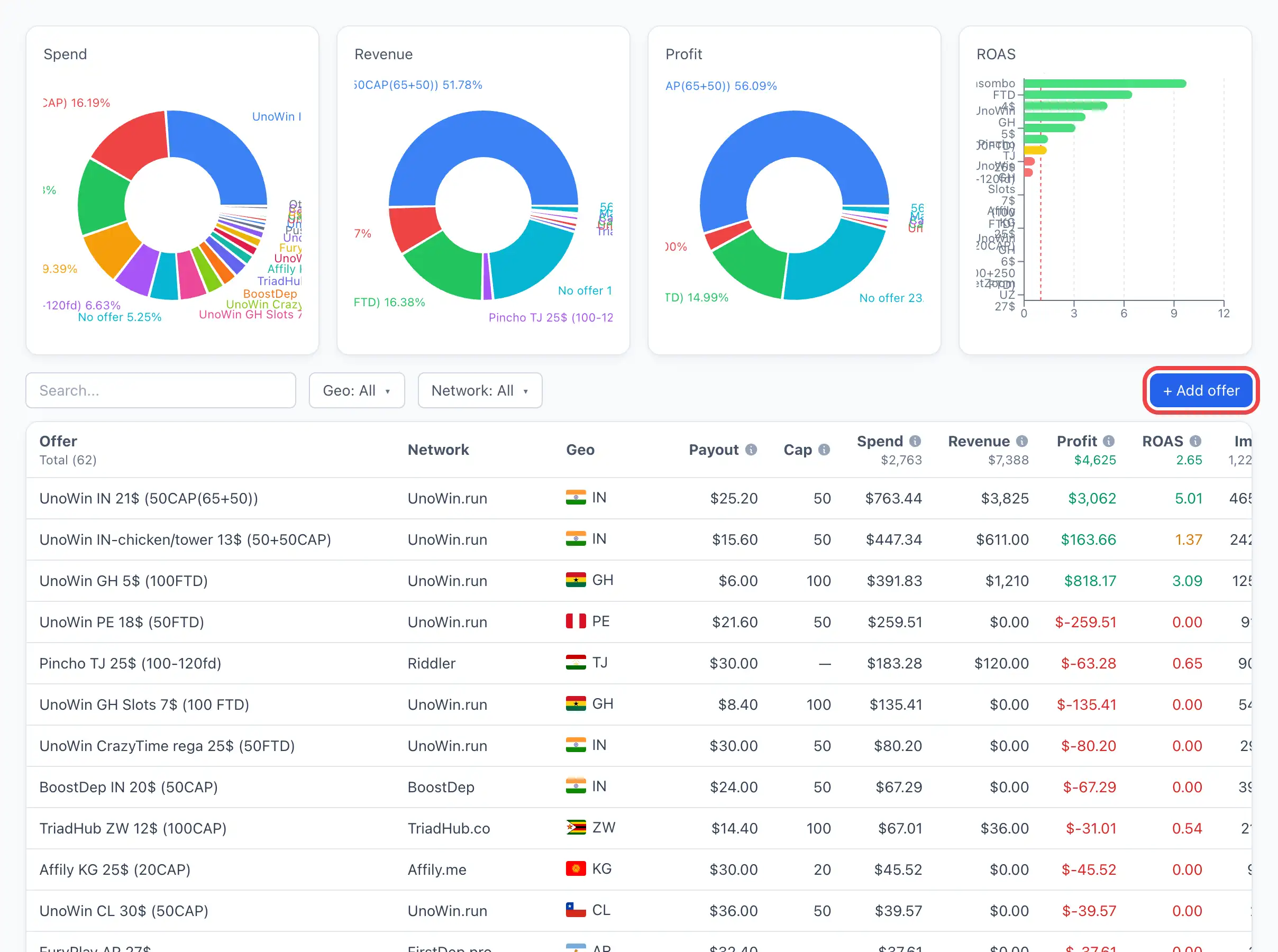
The offers list
The table shows one row per offer. The period at the top of the page sets the interval the metrics are counted over.
Filters and search
- Geo — filter offers by country.
- Network — show offers of the selected network only.
- The search field searches by the offer name.
Columns
The first columns are descriptive, the rest are metrics for the period:
- Offer — the offer name (with the network logo).
- Network — which network the offer is linked to.
- Geo — the offer's countries (flags).
- Payout — the per-conversion rate from the offer options.
- Cap — the daily conversion limit (if set).
- Spend — traffic spend.
- Revenue — earnings on the offer.
- Profit — revenue minus spend.
- ROAS — traffic payback.
- Impressions, Clicks, CTR, CPM — ad metrics.
- Registrations, Deposits — funnel events.
- Visits, Unique Visits, Installs — app visits, unique visits and installs.
- C2R, C2D, R2D, C2I, I2R, I2D — conversions between funnel stages (click → reg → dep, etc.).
The set and order of columns can be customized — unneeded ones can be hidden so the table doesn't get cluttered. Sorting by any metric helps you quickly find the best and the unprofitable offers.
How to add an offer
- Click + Add offer in the top-right corner of the list.
- An empty offer is created, and its card opens right away on the Options tab.
- Fill in the fields and click Save.
A detailed breakdown of all the creation fields — see the article Creating an offer.
The + Add offer button is available only with the permission to manage offers. Without it the list is available for viewing only.
The offer card
The card opens when you click a row in the list. Its header shows the offer's key parameters: Payout, Cap (if set), the country flag and the network name. Below — metric tiles and a chart for the selected period, and below them — tabs.
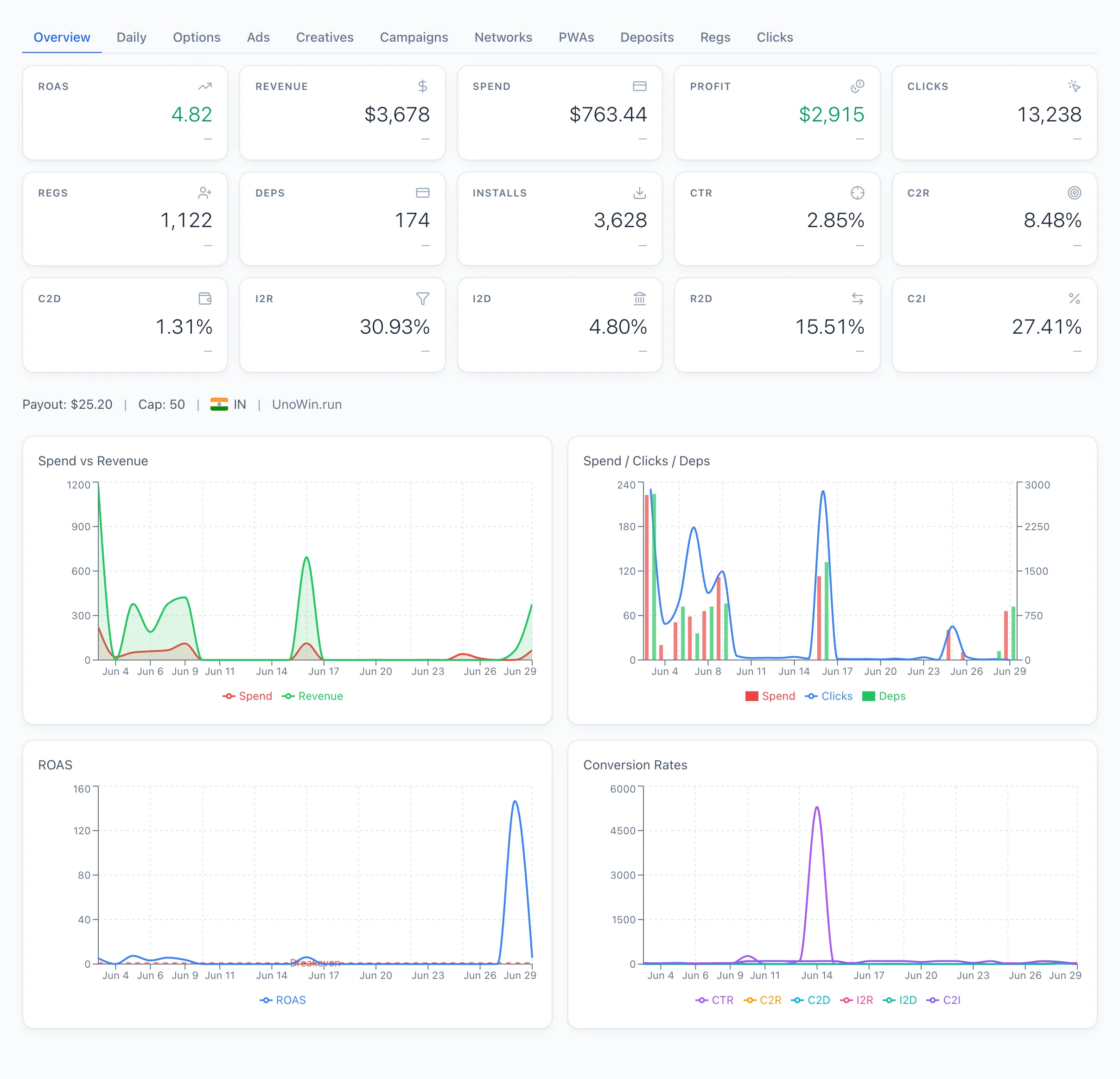
Tabs
- Options — all the offer parameters: network, link, payout, currency, payout type, cap, geo, status, notes. The list of macros for the link is here on the right too. Field breakdown — see Creating an offer.
- By day — daily dynamics of the offer's metrics.
- Ads — the ads that led to this offer.
- Creatives — the creatives used in the offer.
- Campaigns — the ad campaigns for the offer.
- Networks — a breakdown by network.
- PWA — landing pages (PWAs) that drove traffic to the offer.
- Deposits — deposits counted for the offer.
- Registrations — registrations on the offer.
- Clicks — clicks on the offer.
In the tab tables the rows are clickable — following one opens the card of the related entity (ad, creative, campaign, network, PWA).