Set up cloaking
This scenario sets up cloaking on a campaign: real traffic reaches your offer, while moderators, bots and unwanted geos see a neutral whitepage. Cloaking is a gatekeeper filter that runs before the campaign rules — understanding that order is the key, so it is worth skimming Flows and distribution first.
What you need beforehand: a campaign (see Creating a campaign) and a whitepage among your websites — a neutral page to show cut-off visitors (see Websites).
1. Open the campaign funnel
Open the Campaigns section, open your campaign and go to the Settings tab. The cloaking switch sits at the top of the Funnel block, above the rules.
2. Turn cloaking on
Enable cloaking. While it is off, every visitor goes straight to the rules; once on, visitors first pass the filters below and only then reach the rules.
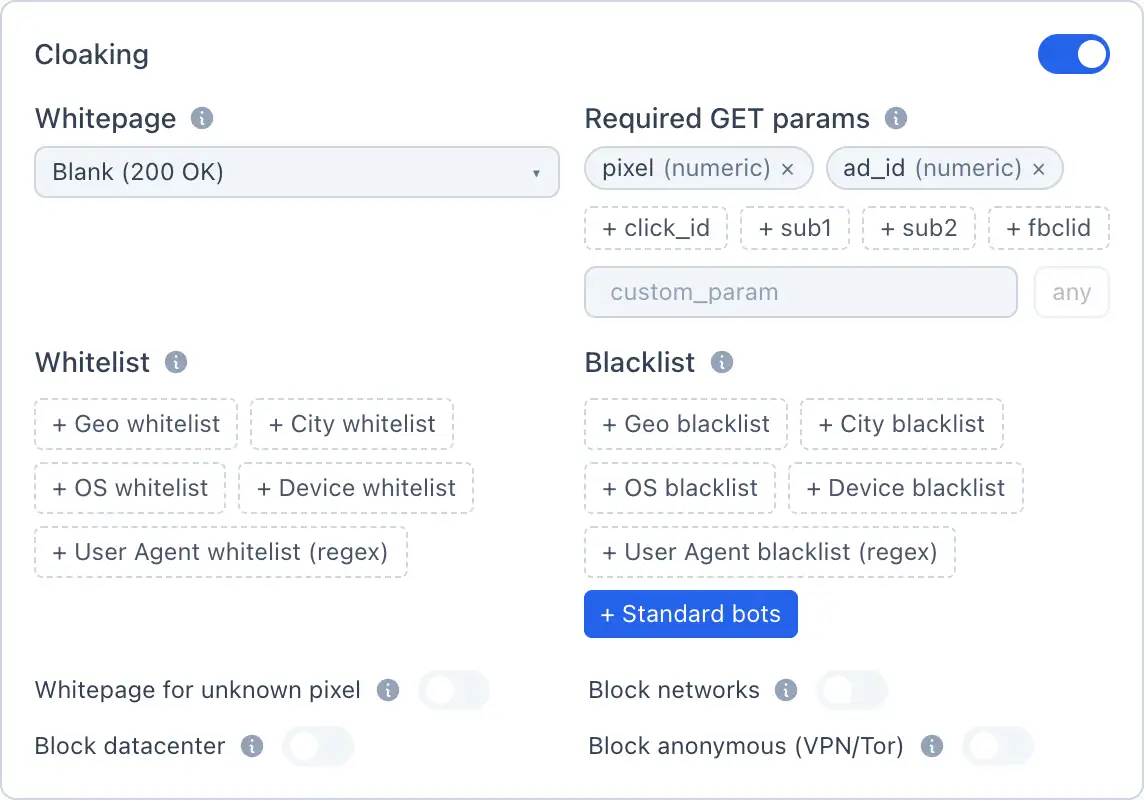
3. Set the filters
Configure who is let through and who is cut off. All of these are optional — an empty filter means there is no check by that parameter:
- Required GET parameters — a visitor who arrives without them is cut off.
- Whitelist (geo / OS / device / UA-regex) — let through only matches.
- Blacklist (geo / OS / device / UA-regex) — block matches.
- Block networks — block known hostings, scanners and bot networks.
- Block datacenter — block datacenter IPs.
- Block anonymous (VPN/Tor) — block VPN, Tor and anonymous proxies.
For the full meaning of each filter — see Cloaking.
4. Choose the whitepage
Pick the Whitepage — the page a cut-off visitor sees. Choose it from your websites; usually it is a neutral page that looks fine to a moderator.
If no whitepage is selected, a cut-off visitor gets an HTTP 200 with an empty body instead of a real page. For a clean review experience, always set a whitepage.
5. Set the destination for real traffic and save
Below cloaking, set up the rules and targets so that the traffic that passed the filter reaches your offer (a PWA or landing with the offer). Then click Save. For the rules-and-targets model — see Flows and distribution.
🎬 GIF: adding a rule with the offer target and saving
Done
Cloaking now stands in front of your campaign: real visitors reach the offer, everyone else sees the whitepage. Next: